
Table of Contents
- Why integration matters more than most small teams realize
- The most common tools small businesses use—and where background checks fit
- What a connected hiring stack actually looks like end-to-end
- How to set up your integration without disrupting your current process
- What to do if your tool isn’t on the integrations list
- How integration reduces manual work over time
- See how Checkr connects to the tools you already use
Ready to run background checks the modern way?
Key takeaways
- Integration reduces manual work by eliminating duplicate data entry and manual status tracking across your ATS, HRIS, and payroll tools
- An ATS integration lets you trigger background checks directly from the candidate record instead of managing screening in a separate system
- Connecting to your HRIS ensures only cleared candidates move into onboarding, with screening status reflected automatically
- You don't need every system connected to start—begin with one integration and expand as your process grows
- No native integration available? A consistent manual process—one trigger point, one shared tracker—still cuts coordination overhead
Hiring teams often add tools over time as their needs grow. Your ATS helps manage candidates, your HRIS organizes employee information, and your payroll platform handles new hire details. But when background checks sit outside those systems, someone has to manually move data between them, track progress, and make sure each step is completed.
Integrating background checks into your existing hiring stack keeps information connected across systems, reduces manual coordination, and helps your team move candidates through hiring without adding administrative work.
In many cases, integration doesn’t require you to redesign your hiring process. Instead, it connects the steps you’re already following so data moves smoothly between systems.
Why integration matters more than most small teams realize
For many small and mid-sized teams, the hiring process is already in place. Candidates move through the pipeline, offers go out, and background checks get completed. The challenge becomes more apparent as more candidates move through the process and more people become involved.
When candidate information lives in one system and background checks live in another, someone has to transfer details between them. Manual entry creates opportunities for data to be missed, entered incorrectly, or require additional follow-up. The more systems your team uses independently, the more those small handoffs begin to accumulate.
Disconnected tools can also create gaps in the workflow. A background check may not be triggered at the right stage, leaving a candidate waiting while the next step is identified. Results may sit in a separate portal, requiring someone to track down the latest status before updating the candidate or moving forward. These extra steps make it harder for small teams to keep track of what needs to happen next, especially when multiple people are involved.
The same logic applies to background checks: keep information moving between systems, automate routine updates, and give your team a clearer view of each candidate's progress.
The most common tools small businesses use—and where background checks fit
Most small business hiring stacks include a combination of an ATS, an HRIS, and, in some cases, a payroll platform. Background check integrations help connect these systems by moving candidate data between the tools teams already use.
ATS (Applicant Tracking Systems)
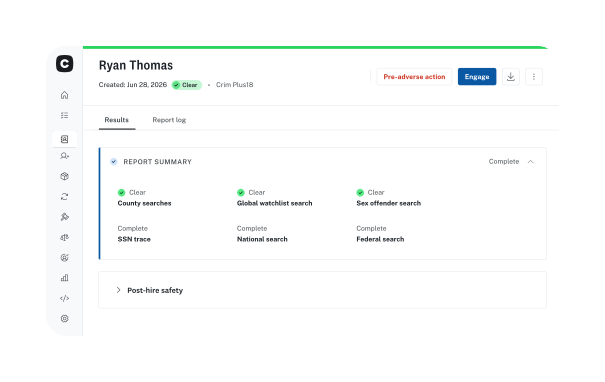
Your ATS is where hiring decisions take shape. Many modern ATS platforms offer native integrations with background check providers, allowing screening to become part of the existing hiring workflow. Instead of managing screening in a separate system, teams can initiate checks from the candidate record and keep hiring records consistent throughout the process.
When evaluating a background check integration with your ATS, consider how well it supports your existing hiring workflow. Look for an integration that helps your team:
- Start screening at the right point in the hiring process after an offer is made.
- Keep screening results accessible within the candidate record to help teams find the information they need without searching across multiple systems.
- Let hiring managers review results and take next steps from the candidate record.
HRIS and people operations platforms
An HRIS integration becomes most valuable when a candidate moves from hiring to onboarding. It helps ensure candidates move into onboarding only after the required background check is complete, while keeping screening status and records updated in the HRIS.
By reducing manual updates, the integration helps prevent onboarding steps from starting too early and keeps employee records accurate and consistent.
Payroll platforms
Payroll integrations allow candidate data to move between systems after the required screening steps are complete.
If a candidate is added to payroll before screening is complete, teams may need to spend time correcting records or updating information manually. A centralized process reduces these extra steps and helps keep new hire records accurate from the start.
With integration vs. without integration: side-by-side comparison
Without integration
With integration
- ATS
- Copy candidate information
- Background check portal
- Check status manually
- Download report
- Email hiring manager
- Update ATS
- Move candidate to HRIS
See where background checks fit in the full hiring workflow
The Small Business Hiring Playbook shows how each stage connects—and where screening fits into a more efficient process.
What a connected hiring stack actually looks like end-to-end
When background checks are integrated with the tools you already use, screening becomes part of the hiring workflow. Automation helps reduce manual steps while keeping the process simple for your team.
The difference between a connected background check workflow and one that relies on manual steps is the amount of coordination your team needs to manage. A connected process reduces handoffs, keeps information visible, and helps hiring move forward with fewer delays.
A candidate applies through the ATS, progresses through the interview process, and reaches the stage where screening is required. The background check is initiated, the candidate completes the required consent steps, and results are returned to the hiring system for review. Once the candidate is cleared, the information can move into the HRIS to support onboarding.
The result is an integrated hiring workflow where screening happens at the right stage, updates move between systems, and teams spend less time managing manual steps.
Administrative work removed:
- Re-entering candidate information
- Checking separate portals
- Sending manual updates
- Maintaining duplicate records
Candidates feel the difference too: consistent updates mean less guessing about what happens next.
How to set up your integration without disrupting your current process
One of the biggest concerns for small teams is disrupting a hiring process that already works. Rather than replacing a workflow, most integrations are designed to support it by automating the handoffs that already happen between hiring stages.
Start by identifying where extra steps slow hiring today. Look for places where your team is:
- Copying candidate information between systems
- Checking statuses manually
- Coordinating updates between hiring teams and candidates
These are the areas where connecting systems can have the biggest impact. Reviewing who needs visibility, what information needs to move between tools, and where delays occur will help identify how the integration can reduce manual work.
Test the process with one type of hire before expanding. Confirm that screening starts at the right point, information appears where your team needs it, and the workflow supports the way your team hires. This gives you a chance to identify and address any gaps before applying the process more broadly.
Finally, communicate the change clearly. Make sure your hiring team knows what happens automatically and where action is still needed. Clear expectations help prevent missed steps and keep the process moving smoothly.
What to do if your tool isn’t on the integrations list
Not every team has tools that connect directly with their background check provider. That doesn’t mean you need to rebuild your hiring process or manage screening indefinitely.
If you’re just getting started with background screening or don’t have a dedicated HR team, you can begin with a simple, consistent screening workflow and add more automation as your needs grow.
Start by creating a consistent process for the steps your team manages today. For example:
- Define when background checks should start in your hiring process.
- Keep screening updates and results in a shared, accessible location.
- Use a simple tracking method to monitor progress and next steps.
Some platforms also support custom connections through webhooks or APIs. If your organization has technical resources available, these options may help connect systems that don’t have a standard integration.
As your hiring needs grow, it’s worth reviewing whether your current tools still support your process. If your team is spending more time moving information between systems, tracking screening steps, or following up on updates, a more connected hiring stack can help reduce the tasks that often come with growth.
Tasks automation removes:
- Data entry
- Status checking
- Candidate follow-up
- Documentation
- Record updates
How integration reduces manual work over time
As hiring volume increases, manual coordination grows quickly. Integration helps prevent that extra work from growing alongside it.
- Fewer status update requests: Automated notifications reduce the need for hiring teams to log in and check progress manually.
- Fewer candidate follow-ups: Candidates receive proactive updates, reducing inbound questions and giving them more visibility into what happens next.
- Automatic documentation: Background check activity is recorded within your system of record, reducing the need for separate tracking and manual updates.
- Easier scaling: A manual process may work for a handful of hires, but it becomes harder to manage as volume increases. An integrated workflow helps your team handle more hiring activity without adding administrative work.
Over time, these changes do more than save minutes. They reduce the coordination required from hiring teams and create a more predictable process.
See how Checkr connects to the tools you already use
A background check platform should fit into the hiring process your team already uses, not create another system to manage.
Checkr connects with many commonly used ATS, HRIS, and hiring platforms to help reduce manual data entry, keep screening steps connected, and give your team better visibility throughout the hiring process.
Connect background checks to the tools you already use
Checkr integrates with the ATS, HRIS, and payroll platforms your team relies on—no new system to manage, no manual re-entry.
Disclaimer
The resources and information provided here are for educational and informational purposes only and do not constitute legal advice. Always consult your own counsel for up-to-date legal advice and guidance related to your practices, needs, and compliance with applicable laws.

About the author
Hayley Harrison began her career as a hiring manager at a mid-size regional bank in the Pittsburgh area. She now brings her experience and knowledge of hiring best practices to her work as a freelancer, helping employers refine and improve their processes.