
Ready to run background checks the modern way?
Key takeaways
- Let the role, industry requirements, and any customer or site requirements guide which checks you run—not every position needs the same level of screening
- Use the same five-step process for every candidate in the same role, from consent through documentation
- Catch common issues early: missing candidate information and unclear decision criteria are the two most common causes of slowdown
- Watch for lower candidate drop-off, fewer follow-ups, and complete documentation—those are the signs the process is actually working
When you’re the only person responsible for hiring, running background checks for your small business can feel intimidating. You worry about what to check, when to check it, and how to stay compliant. And when you’re handling it alone, every decision falls on you.
Even a one-person HR department can run compliant screenings that lead to informed hiring decisions. All it takes is a clear process, consistent timing, and a simple approach to documentation.
5-step background check process
- Conditional offer
- Choose checks
- Obtain consent
- Order check
- Review results
- Document outcome
Why this feels more complicated than it is
Background checks have a reputation for being complicated—especially if you've never run one before and don't have an HR team to lean on.
In reality, the background check process is straightforward for most small business hires. You only need a few things before you run your first check: a candidate who has received a conditional offer, their basic identifying information, and a clear sense of which check applies to the role. A simple five-step workflow provides a framework for consistent screening. After you’ve done it once, each new check becomes easier to repeat.
The five steps, explained plainly
Even on your own, screening becomes simpler when you have a simple, repeatable process to follow every time. Use these five steps to build one.
Step 1—Decide which checks this role requires
When you represent the whole of HR, ordering every screening available can seem like the simplest way to avoid blind spots. In reality, too many checks can complicate the process, giving you extra reports to review and slowing down your hiring timeline. Figuring out what background checks you actually need lets you focus on the information that matters most for the role.
To decide what to screen for, remember:
- Not every role requires the same level of screening. For example, a customer-facing position or a job working with vulnerable populations has different needs than a remote administrative role. Think about what your new hire will be responsible for and let those duties guide you to the appropriate checks.
- Some checks are required, while others are optional. In specific industries and roles, such as healthcare, childcare, and transportation, laws and regulations may mandate certain checks. Look to the regulatory agencies responsible for overseeing your business to determine what’s mandatory.
- Industry standards and customer preferences matter. If you work with enterprise clients, school districts, or regulated facilities, they may specify which screenings are required before someone can work on-site. Certain checks may also be considered part of the baseline in your line of business.
- Rule of thumb: If you’re new to background checks, start with a criminal background check, then add role-specific searches. For example, you might order a motor vehicle report (MVR) for drivers or employment verification for senior hires.
Which checks does this role need?
Role | Common screening |
Office/admin | Criminal background check |
Driver | Criminal and MVR |
Healthcare | Role-specific screening |
Senior hire | Criminal and employment verification |
Step 2—Get candidate consent
Before you run a background check, tell the candidate you’re doing it and get their written permission. This supports compliance with the Fair Credit Reporting Act (FCRA) and keeps the candidate informed about the process.
Timing matters. Ask for consent after you’ve extended a conditional job offer, and don’t run the check until the candidate has completed the written consent form.
Most background check platforms build this step into the workflow. When you order the check, the candidate receives an invitation to a portal that automatically prompts them to review the required disclosure and provide consent. Once they consent, the platform initiates the screening.
Step 3—Order the check
Once the candidate provides consent, you’re ready to order the check. The information you need is usually straightforward: the candidate’s full legal name, date of birth, Social Security number, and current address. Some checks may require additional information, depending on the role and screening package.
When you work with a background check provider, you don’t need to know how to do background checks yourself; the process is simpler than many first-time buyers expect. Instead of hunting down the requirements for each database or search type, you select a package or role-based screening option that fits the position. The platform then collects the right information from the candidate and uses it to initiate the searches included in that package.
How to know when your background check process is working:
- Checks ordered consistently
- Candidates stay engaged
- Fewer follow-ups
- Decisions are consistent
- Documentation complete
Step 4—Review the results
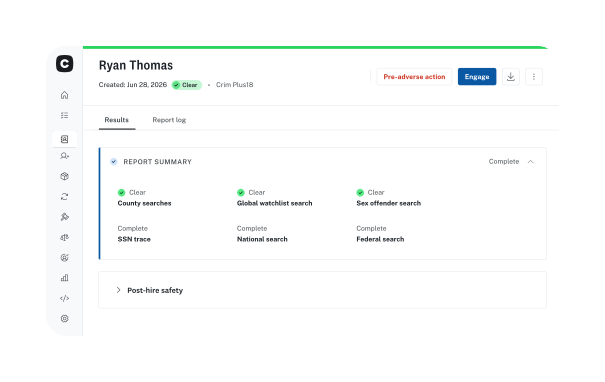
When the background check is complete, you receive the results in an organized report. You won’t have to guess what’s important. Anything that requires your attention is highlighted for your review.
If the report returns negative information, don’t make a snap decision. Review the context, consider whether the finding is relevant to the role, and look at factors like the amount of time that has passed. Apply the same criteria consistently across every candidate so your decision-making process is fair and repeatable.
If the report could affect your hiring decision, follow the required adverse action process before making a final decision. That allows the candidate to review the report, respond, or dispute any inaccuracies before you decide whether to move forward.
Step 5—Document the outcome
After the background check process is complete, document the outcome. Save the consent form, the report, and a brief note explaining the decision and rationale in a secure, organized place.
When you’re handling hiring on your own, keep documentation simple. One secure digital folder per candidate is often enough to keep the process organized. Choose a solution that makes it easy to look back on what happened, when each step was completed, and why you made the final decision. If your hiring team grows in the future, you can move those records into a secure shared folder to keep everyone aligned.
Get a checklist you can reuse every time you hire
The Small Business Hiring Playbook gives you a step-by-step framework to reference for every new candidate.
Where things go wrong — and how to catch them early
Even with a workflow in place, small challenges can slow down the background check process if you don’t catch them early. Most of these issues are preventable once you know what to look for:
- Your candidate information is missing or incomplete. Submitting a check with incorrect or incomplete details is the most common cause of slowdowns. Use a template to ensure you ask candidates for everything you need, and double-check the spelling of names, dates of birth, and Social Security numbers before submitting the check.
- You run checks at different stages for different candidates. Inconsistency creates compliance exposure and slows down decision-making. Pick a consistent trigger point, such as a conditional offer, and stick to it.
- You don’t know what to do if something comes back. Have a simple decision framework in place before you start. Decide what types of findings are relevant to the role and what your process will be if the report may affect your hiring decision.
Quick reference before running your next background check
- Choose checks
- Get consent
- Order screening
- Review results
- Save documentation
How to know when your process is working
Once you implement your new background check process, monitor its performance over time to make sure it remains consistent, clear, and easy to repeat. Signs that the process is working for your business and your candidates include:
- Checks are ordered at the same point every time, for every candidate in the same role. Consistency makes the process easier to repeat and reduces the risk of treating similar candidates differently.
- Candidates aren’t dropping off during screening. Low drop-off indicates that candidates understand the process, know what to expect, and aren’t getting stuck waiting for next steps.
- You’re not sending repeated follow-up messages during the screening stage. Fewer follow-ups mean you’re collecting the necessary information upfront.
- Every hiring decision is defensible. When the system works, you’ll be able to say why a background check result did or did not influence the outcome.
- Your documentation is complete. You have enough information to answer questions later without scrambling.
Ready to run your first check?
Running background checks without an HR team gets easier when each step is clear. With the right workflow, you can choose the right checks, obtain consent, review results, and document decisions consistently. Each hire after your first gets faster, because the framework's already built.
Ready to run your first check?
Checkr walks you through choosing the right screening, collecting consent, and reviewing results—no HR team required.
Disclaimer
The resources and information provided here are for educational and informational purposes only and do not constitute legal advice. Always consult your own counsel for up-to-date legal advice and guidance related to your practices, needs, and compliance with applicable laws.

About the author
Hayley Harrison began her career as a hiring manager at a mid-size regional bank in the Pittsburgh area. She now brings her experience and knowledge of hiring best practices to her work as a freelancer, helping employers refine and improve their processes.