
HR Systems
Integrate Checkr with Intuit QuickBooks to hire safely, confidently, and efficiently. Get started through your QuickBooks account, or fill out the form to speak with Checkr.
How we partner with Intuit QuickBooks
Streamlined operations
The Checkr integration with QuickBooks streamlines the background check experience for hiring managers by removing friction between the offer letter and background check, keeping the hiring process efficient and on track.
Accuracy and compliance
Checkr’s leading technology helps reduce the chance for human error and delivers faster, more accurate background checks. Compliance tools help you encourage consistency and mitigate risk.
Top-tier candidate experience
Checkr gives candidates a mobile-first, transparent view of their background check, accurate ETAs, and access to dedicated candidate support—helping you keep top talent in your funnel.
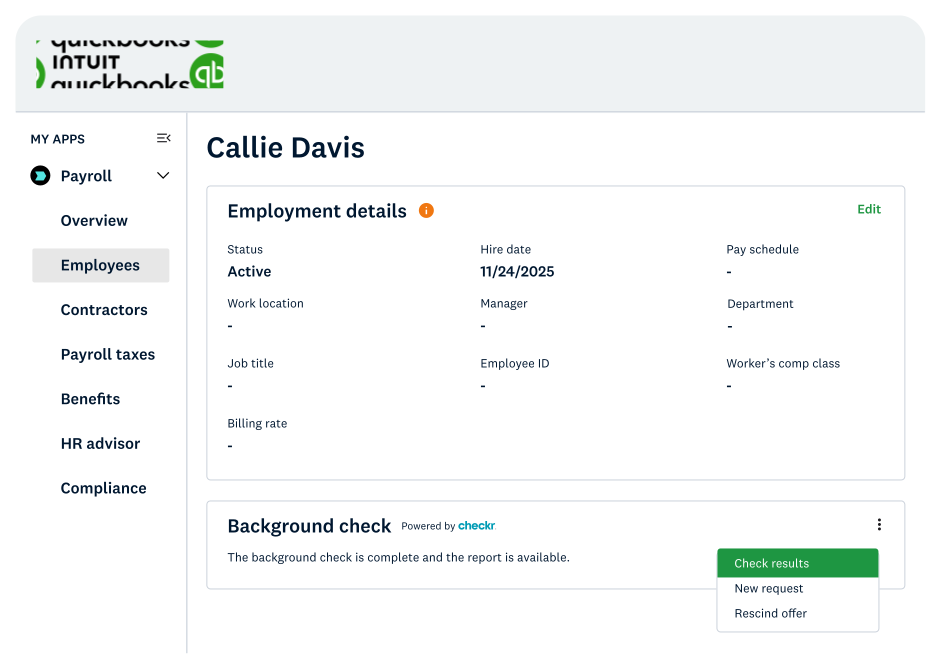
Checkr and Intuit QuickBooks
As Intuit’s preferred background check partner, Checkr helps growing businesses experience a more streamlined hiring process that includes:
- Seamless workflows
- Operational efficiency
- Trust and compliance
- Unified experience
Checkr and Intuit QuickBooks pricing
Basic
Our most affordable option with limited criminal search
Starting from
$29.99 / report*
- SSN trace
- Sex offender registry
- Global watchlist search
- National criminal search
Most Popular
Essential
Enhanced criminal search for expanded results
Starting from
$59.99 / report*
- Identity verification
- SSN trace
- Sex offender registry
- Global watchlist search
- National criminal search
- Unlimited county criminal search
Complete
Maximum criminal search across our most comprehensive databases
Starting from
$94.99 / report*
- Identity verification
- SSN trace
- Sex offender registry
- Global watchlist search
- National criminal search
- Unlimited county criminal search
- Unlimited state criminal search
- Federal criminal search
Enterprise
Custom solutions to meet your specific hiring requirements
Contact sales for pricing
Additional screenings are available as add-ons, including drug testing, professional license and employment verifications, and more.
Note: Checkr works with state and county courts, DMVs, databases, and other third parties to complete your background checks. *Some of these parties impose surcharges (“passthrough fees”) to the public to retrieve records. These passthrough fees are included in your invoice.

Get started with Checkr and Intuit QuickBooks in just a few steps
Connect to Intuit QuickBooks
In your QuickBooks account, navigate to any Worker Profile and click Sign Up on the Background Check tile.
Register for Checkr
Create a new Checkr account or sign in to your existing account.
Run your first check
Order and review background checks directly from Intuit QuickBooks and start making faster, more confident hiring decisions.
Streamline your hiring flow with Checkr
Get faster, smoother background checks that work the way you do with our easy-to-implement Intuit QuickBooks integration.