
Ready to run background checks the modern way?
Every product update we ship starts with the same place: customer feedback.
In the second half of 2025, hiring teams told us they’re moving faster, managing more complexity, and relying on technology to shape real decisions, not just support workflows.
They asked for clearer answers. More dependable data. Less friction. And stronger confidence that their systems are accurate, fair, and built to scale.
So that’s what we focused on.
Across this release, we invested in smarter, AI-ready workflows, simplified the hiring experience, and strengthened safety and compliance before, during, and after the hire.
Here’s a look at what’s new and how it’s helping teams make confident, explainable hiring decisions.
Building smarter, AI-ready workflows
Candidate MCP: Bringing trusted data into AI-powered workflows

What’s new: Candidate MCP (Model Context Protocol) introduces a new way for teams to access and use background check data by connecting Checkr directly into AI-powered workflows. Instead of relying solely on dashboards, exports, or custom-built reports, teams can now ask questions in natural language and receive structured, trustworthy answers pulled directly from Checkr’s systems.
This first release focuses on secure, status-level access to background check data, enabling AI agents, copilots, and internal tools to query things like report status, completion timelines, and screening details in real time.
How you benefit: As teams increasingly rely on AI tools to manage operations, MCP meets them where they work. Instead of context-switching between dashboards, tickets, and manual exports, users can interact with Checkr data directly inside the tools they already use.
Because MCP is built on Checkr’s existing secure and compliant infrastructure, every answer is grounded in the same trusted data customers rely on today. That means responses are not just fast, but dependable, explainable, and auditable. MCP helps reduce manual status checks, eliminates fragile integrations, and gives teams immediate visibility without sacrificing accuracy or security.
Best for: Teams exploring AI-assisted workflows. MCP is especially valuable for organizations building internal copilots, automation workflows, or operational dashboards that require real-time insight into background check activity.
A faster, clearer way to review reports
What’s new: The redesigned report list experience introduces a more flexible, workflow-friendly way to review background check reports. With improved filtering, sorting, saved views, and a customizable table, teams can now tailor the report list to match how they actually work day to day.
This update builds on the foundation customers already rely on, while adding modern capabilities that make it easier to manage large volumes of reports.
How you benefit: Instead of scanning long, static lists or relying on external spreadsheets, recruiters and adjudicators can quickly zero in on what needs attention. Whether it’s identifying reports that are ready for review, tracking disputed cases, or prioritizing by status, the redesigned report list helps teams move faster with more confidence.
The ability to customize views means less time searching and fewer manual workarounds. Teams spend more time making decisions and less time managing the system.
Best for: High-volume or distributed hiring teams using Assess Premium, managing large screening pipelines, especially those looking to streamline adjudication workflows and reduce operational friction without changing how they make decisions.
Analytics refresh: Clearer insights, faster answers
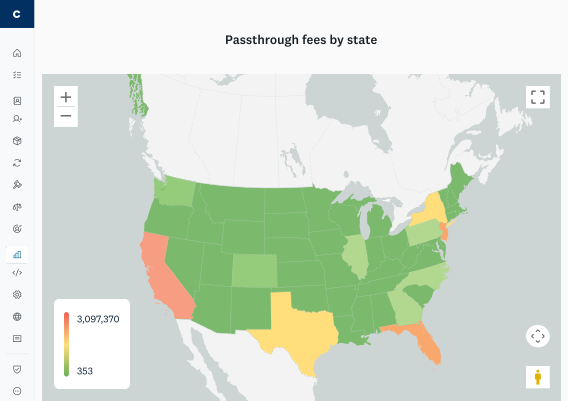
This map highlights pass-through fees by state, giving you a clear view of where jurisdictional costs are concentrated across your hiring footprint. With Checkr Analytics, you can quickly identify high-cost regions, understand spend drivers, and forecast hiring budgets with greater precision.
What’s new: Updated analytics dashboards across Criminal, MVR, Adjudication, and billing views deliver faster refresh times and clearer visuals.
How you benefit: Teams can spot trends, track pass rates, and understand bottlenecks without exporting data or waiting for reports. This visibility that supports faster, more informed decisions.
Best for: Organizations looking to manage hiring performance and risk at scale.
Criminal tab: Clearer visibility into criminal screening performance
What’s new: The new Criminal tab in the Analytics dashboard centralizes insight into criminal screenings, assessments, adjudications, and turnaround time (TAT). It brings together report volume by package, status, and outcome trends, turnaround performance by state and county, detailed charge analytics, and visibility into continuous criminal monitoring activity.
How you benefit: Teams can understand where criminal reports are slowing down, how often they land in Review or Escalated, and what types of charges are driving decisions. This makes it easier to diagnose bottlenecks, set expectations with hiring managers, and refine screening and adjudication strategies using real data instead of ad hoc exports.
Best for: Customer-facing teams and operations leaders who need a concise, data-backed view of criminal screening performance and risk—whether to support customer conversations, optimize workflows, or inform decisions about adopting Continuous Checks.
MVR tab: Clearer visibility into driving risk and incidents
What’s new: The new MVR tab in the Analytics dashboard centralizes insight into motor vehicle report screenings, incidents (accidents, suspensions, violations), report assessments, adjudication decisions, and turnaround time (TAT). It brings together how many MVR reports you’re ordering and completing over time, how often incidents are found, how those incidents are evaluated with Assess, and how quickly reports are being completed across states.
How you benefit: Teams can quickly see where MVR reports are slowing down, how often incidents lead to escalated or review decisions, and which types of incidents are most common in their driver population. This makes it easier to diagnose bottlenecks, set expectations with hiring managers, evaluate the value of MVR screening, and identify where Continuous MVR monitoring could reduce risk and improve safety.
Best for: Customer-facing and operations teams that need a focused, data-backed view of driving-related risk and performance, whether to support customer conversations, optimize MVR workflows, or decide when to adopt or expand Continuous MVR.
Billing tab: Clearer insight into invoices and fees
What’s new: The new Billing tab in the Analytics dashboard gives teams a consolidated view of billing activity at the parent billing account level. It surfaces invoice history, estimated current-month invoice totals, monthly report, and fee trends, and a detailed breakdown of state, county, DMV, education, and employment fees, with options to drill into specific invoices, packages, locations, and report IDs.
How you benefit: Teams can more easily understand what’s driving invoice amounts over time, compare current spend to prior periods, and spot changes in fees or report volume without pulling ad hoc data. With invoice search, payment profile filters, heat maps, and county-level tables, finance, RevOps, and CS teams get a clear, self-serve view of where fees are accruing and which packages, regions, or customers are contributing to trends.
Best for: Finance, RevOps, and customer-facing teams that need transparent, data-backed visibility into invoices and fees so they can answer billing questions quickly, manage budgets, and support customers with clear explanations of their Checkr spend.
Removing friction across the hiring lifecycle
Smarter recommendations based on roles and industry
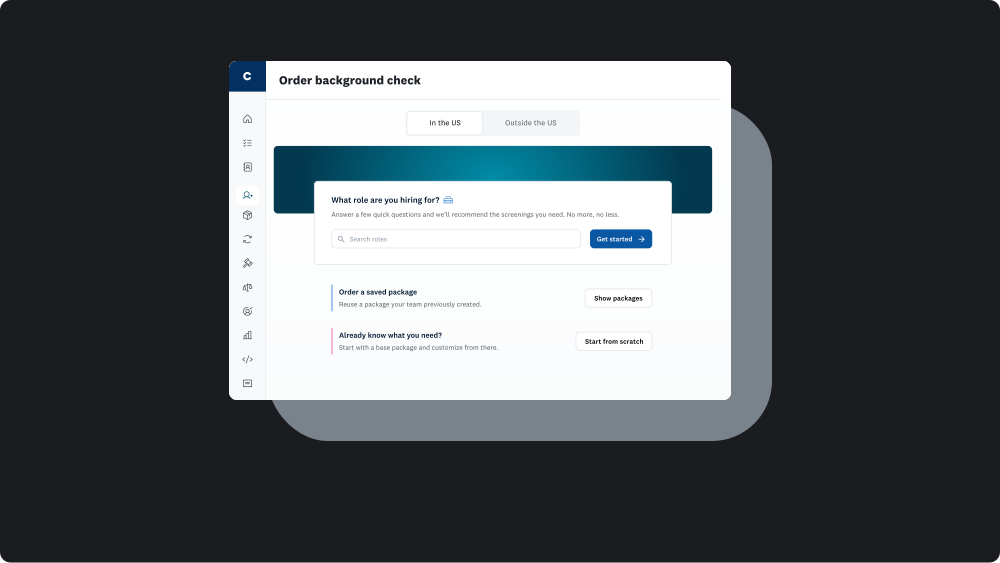
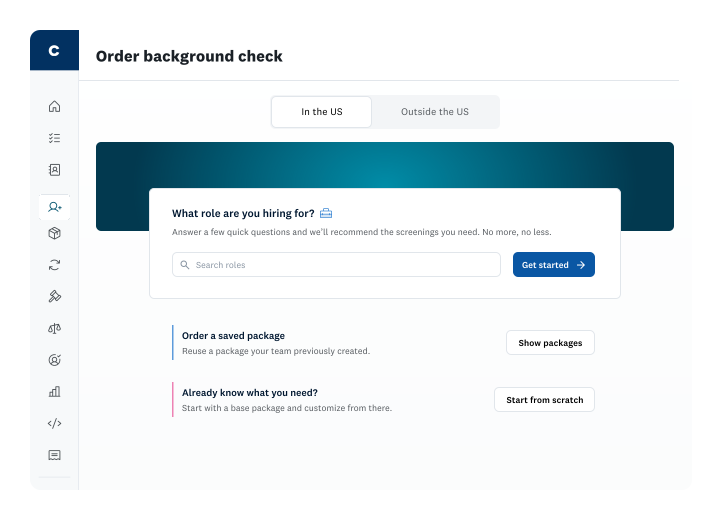
What’s new: We introduced tailored screening recommendations and a revamped order experience for self-serve customers. When new customers sign up, they now select their industry and optionally the roles they’re hiring for. On the Order landing page, they can choose from three paths: follow role-based recommendations, re-order a saved package, or start from scratch. The recommendations path asks a few simple questions about the role, then suggests a base criminal package and relevant add-ons based on industry, responsibilities, and risk profile. Customers can also create, save, and re-use custom packages so they don’t have to rebuild their preferred configurations every time.
How you benefit: You get clear, role- and industry-specific guidance without needing to be a background check expert. The experience reduces guesswork and helps you select the right screenings the first time, while still giving you the flexibility to adjust or build your own packages as your program matures. Lean teams move faster with more confidence, and more experienced teams can standardize best-practice packages, re-order them in a few clicks, and keep hiring workflows consistent across locations and roles.
Best for: Self-serve and SMB teams with limited compliance resources, as well as fast-growing organizations that want to scale hiring with consistent, role-appropriate screening policies and fewer mistakes.
Clearer order summary and mobile-first review
What’s new: A new shopping cart-style order summary and an improved Review and Submit page provide clearer visibility into selections, fees, and required actions. Both are fully mobile-optimized.
How you benefit: Fewer surprises at checkout and a smoother ordering experience, even on the go.
Best for: Teams placing orders across devices or managing hiring on tight timelines.
Making trust easier to scale: Before, during, and after the hire

Identity verification (IDV): Stop risk earlier
What’s new: Identity verification is now built directly into the Checkr-hosted background check application as a pre-background check step that confirms who a candidate is and where they’re located before screening begins.
Candidates capture a live photo of a government-issued ID (such as a driver’s license or passport) and take a liveness selfie that is matched to the ID, with device and location fingerprinting running in the background to flag risky behavior, like masked locations or access from outside the US. When a candidate passes IDV, their background check kicks off automatically, and key identity fields are pre-filled with verified data; if they fail or don’t complete IDV, the background check does not start, preventing unnecessary screenings on potentially fraudulent or unverifiable identities.
How you benefit: You catch fraud and impersonation earlier in the process, reduce wasted spend on background checks that should never run, and gain stronger confidence that you’re screening the right person with accurate data from the start. Because IDV is non-FCRA and integrated into your existing workflow, you can use results to shape your internal policies for when to proceed, re-verify, or stop the process altogether—without having to stitch together multiple vendors.
Best for: Remote, distributed, or high-risk hiring environments where identity fraud, location spoofing, or synthetic identities are a concern, and organizations that want to improve data quality, reduce unnecessary background check costs, and create a smoother, more secure candidate experience from the very first step.
Continuous MVR and auto-enrollment
What’s new: Continuous MVR is our ongoing, post-hire monitoring service for drivers that automatically alerts you when there are new incidents on a driver’s record, such as violations (including DUIs, speeding, and failures to appear), license suspensions or revocations, and, in some states, accidents.
Checkr continuously monitors state DMVs and, where applicable, state-sponsored monitoring programs across nearly all US states. When a state reports a qualifying change, Checkr automatically orders a full MVR with the same level of detail as a standalone MVR and applies your adjudication criteria.
We’ve also made it easier to manage enrollments at scale with flexible options via the API, dashboard-based individual and bulk enrollment, and automated rules that enroll drivers immediately after a pre-employment MVR is complete.
How you benefit: You learn about critical driving incidents months sooner than with annual or ad hoc MVR reruns, shrinking the blind spot between pre-employment checks and future incidents. Earlier visibility helps you act quickly to reduce legal, safety, and insurance risk, while continuous monitoring ensures you aren’t surprised by a suspended license or serious violation long after it happens.
Because monitoring and billing are automated and integrated into your existing Checkr workflows, your teams spend less time manually tracking renewals or pulling reports and more time focusing on decisions. Combining Continuous MVR with your existing MVR program provides timely alerts and a more complete view of driving history, helping you maintain brand trust and demonstrate a proactive commitment to safety.
Best for: Transportation, logistics, gig, and other safety-sensitive programs that rely on driving as a core part of the role, as well as organizations that want to modernize from annual reruns to continuous safety monitoring, reduce administrative overhead, and confidently scale driver programs while managing risk.
Dual vendor drug testing for better coverage
What’s new: A second drug testing vendor improves clinic availability and routing flexibility.
How you benefit: Fewer delays for candidates and greater reliability for hiring teams.
Best for: Organizations with distributed or field-based workforces.
Raising the bar on safety, compliance, and fairness
ISO 42001 certification for responsible AI
What’s new: Checkr became the first background check provider to earn ISO 42001 certification, the new international standard for responsible AI governance. This certification recognizes how Checkr AI is designed, built, and overseen—from how we manage AI risk and document our systems to how we continuously monitor and improve our controls.
How you benefit: As AI plays a bigger role in screening and hiring, ISO 42001 gives you added assurance that Checkr’s AI systems are governed responsibly, transparently, and with human decision-makers firmly in control. You can rely on Checkr AI to turn messy, fragmented data into accurate, explainable insights while meeting stringent standards for privacy, security, and fairness.
Best for: Organizations that are scaling AI-driven hiring and trust workflows and need vendors who meet internationally recognized standards for responsible AI. Especially valuable for enterprises in regulated industries, teams with strict security and compliance requirements, and any company that needs clear evidence that their background check provider is handling AI with rigor, accountability, and long-term governance in mind.
Assess compliance rules and context date enforcement
What’s new: We introduced a new Compliance tab in Assess Premium with 13 pre-built rules that reflect state and local laws limiting how certain records can be considered in adjudication. These rules are separate from CRA reporting requirements already managed by compliance filters and include built-in guidance on when they apply, any job-based exemptions, and flexible settings to apply them only where required or across all locations.
How you benefit: You don’t need to manually track or encode complex jurisdiction-specific restrictions into your policies. Instead, you can turn on pre-built Assess Compliance Rules, review clear guidance for each, and choose how they apply in your rulesets. This helps reduce compliance risk, cut down on manual review, and keep adjudication more consistent, explainable, and aligned with applicable law.
Best for: Multi-state and compliance-focused employers, and legal, HR, and operations teams that need scalable, standardized decisioning rules without becoming experts in every state and local requirement.
Moving forward, together
Every update in this release is part of a broader platform strategy to help you make confident, explainable hiring decisions at scale.
Whether you’re exploring AI-ready workflows, simplifying hiring operations, or strengthening compliance and safety, we’re building tools that evolve with your needs.
Thank you for continuing to shape what we build next.
Ready to hire with confidence?
Explore the full winter product release with our on-demand webinar, or connect with the Checkr team to learn more.

About the author
As a Senior Product Marketing Manager, Jeff blends storytelling and strategy to bring Checkr products to life—connecting what’s built to what customers truly need. With a passion for championing the voice of our customers, he turns insights into narratives that drive adoption and spark connection.