
Ready to run background checks the modern way?
Hiring is getting harder for small and mid-sized employers, who face challenges ranging from labor shortages to complex compliance demands and lean HR teams. Too often, fragmented hiring systems slow hiring, add friction, and increase risk. That’s why we’re excited to announce that Checkr’s background check technology is now integrated directly into Intuit QuickBooks Online Payroll. (For larger organizations, Checkr is also available in Intuit Enterprise Suite.)
Growing businesses can now run background checks within the same platform where they already manage workers—saving time, reducing manual steps, and helping them win the battle for top talent.
"By embedding Checkr's background check technology directly into QuickBooks Online Payroll and Intuit Enterprise Suite, we're making it easier for millions of businesses to hire safely, confidently, and efficiently."
Kristen Faris
Senior Vice President of Sales Solutions, Checkr
Easing hiring friction for growing businesses
Employers are no strangers to the headaches that come from disconnected tools to handle payroll, HR, and background screening. Siloed systems force hiring managers to constantly switch between platforms and re-enter data in multiple locations. In addition to costing employers valuable time, manual processes multiply the risk of human error and make it more difficult to maintain compliant, consistent hiring processes.
Checkr’s integration with QuickBooks eliminates much of the friction by seamlessly incorporating the background screening process into employers’ existing workflows. Now HR professionals can run background checks where they already manage workers, saving time and simplifying workflows without adding yet another system to the tech stack.
Run faster, easier background checks in QuickBooks now
Background checks built directly into QuickBooks
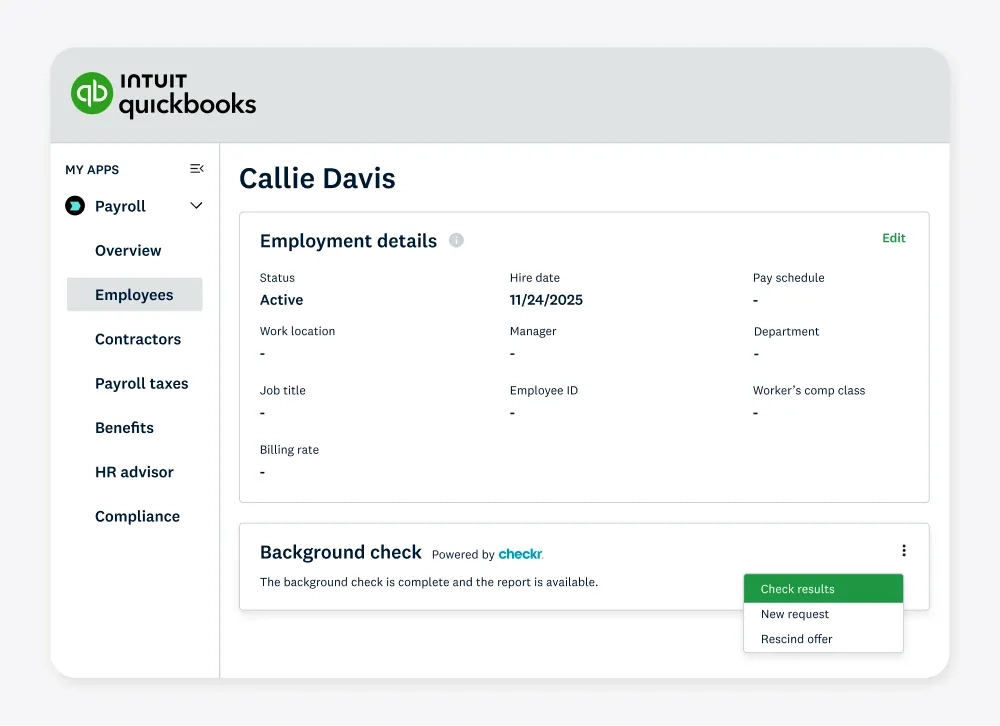
With Checkr built into QuickBooks, HR professionals can start background checks directly from a Worker Profile. There’s no need to log into a separate system or manually input candidate information.
Once a background check is underway, HR teams can track screening status in real time without leaving QuickBooks. When detailed review, adjudication, or adverse action is required, users can easily view the full report in Checkr.
For larger or more complex operations, the same seamless experience is available in Intuit Enterprise Suite, providing consistency as your organization scales.
"Set up was pretty seamless, and we’re happy with the Complete package."
A-1 Seamless Gutters LLC
Checkr + QuickBooks Online Payroll customer
Flexible screening options built for growing businesses
Embedding background checks directly into employee profiles within QuickBooks Online Payroll and Intuit Enterprise Suite is a game-changer for small and midsized businesses.
Timesaving, streamlined workflow
Screening, payroll, and HR tools now live in one platform, easing friction for busy HR teams. Centralizing worker information and screening status reduces manual steps and duplicate data entry for faster, more consistent hiring.
Confident, compliant hiring
Checkr’s modern platform delivers fast, accurate background screenings to support fair and compliant hiring. Clear, consistent processes help small and midsized businesses reduce errors, make safer hiring decisions, and navigate complex regulatory environments with confidence.
Packages and pricing that grow with you
The integration supports all Checkr pre-bundled background screening packages, including employment and education verifications, drug testing, and motor vehicle record (MVR) checks. Pricing is always transparent, and customers can select package options inside QuickBooks and Intuit Enterprise Suite.
Checkr has the flexibility to scale with your growing business as your hiring needs change. Use the Checkr package builder to choose the right package mix or add checks to customize packages for your organization’s evolving needs.
"[The integration of] Checkr's background check technology directly into QuickBooks Online Payroll and Intuit Enterprise Suite is streamlining the hiring process [for] employers who are expanding their workforce.”
Olivier Bartholot
Vice President, Segment Leader, Intuit Workforce Solutions
It’s easy to get started with Checkr
Getting started with Checkr background checks in QuickBooks is simple.
- Find the Background Check option in your QuickBooks Worker Profile and click “Sign up.”
- Create or connect your Checkr account and submit the required information, including payment details. (Background screening invoices will come from Checkr, not Intuit.)
- Start sending background check invitations directly from the Worker Profile.
- Track statuses in QuickBooks; click View to open the full report in Checkr for deeper review.
To start running background checks directly within QuickBooks Online Payroll or Intuit Enterprise Suite, visit the Intuit/Checkr Integration User Guide.
Checkr + Intuit: Transforming how growing businesses hire
Together, Intuit and Checkr are helping growing businesses move faster and compete for talent in an increasingly complex labor market. With Checkr’s background check solution in QuickBooks Online Payroll, small and midsized employers can minimize manual work, streamline hiring workflows, and make confident, compliant hiring decisions, all from a platform they already trust.
Checkr is available to all QuickBooks Online Payroll and Intuit Enterprise Suite customers as part of a multi-year preferred partnership.
Getting started is easy: Sign in to QuickBooks, activate Checkr, and run your first background check.
Run faster, easier background checks in QuickBooks now

About the author
Leslie leads Product for integrations at Checkr. She creates delightful experiences to enable HR tools to seamlessly integrate and access trusted data products that power safe and fair decisions.